合 PG 14 + Pgpool-II + Watchdog 实现高可用
Tags: PG高可用Pgpool-IIPG 14Watchdog单点故障自动转移
文章目录[隐藏]
参考:https://www.pgpool.net/docs/latest/en/html/example-cluster.html
Pgpool-II + Watchdog配置示例
This section shows an example of streaming replication configuration using Pgpool-II. In this example, we use 3 Pgpool-II servers to manage PostgreSQL servers to create a robust cluster system and avoid the single point of failure or split brain.
PostgreSQL 14 is used in this configuration example. All scripts have been tested with PostgreSQL 10 and later.
1. Requirements
We assume that all the Pgpool-II servers and the PostgreSQL servers are in the same subnet.
2. Cluster System Configuration
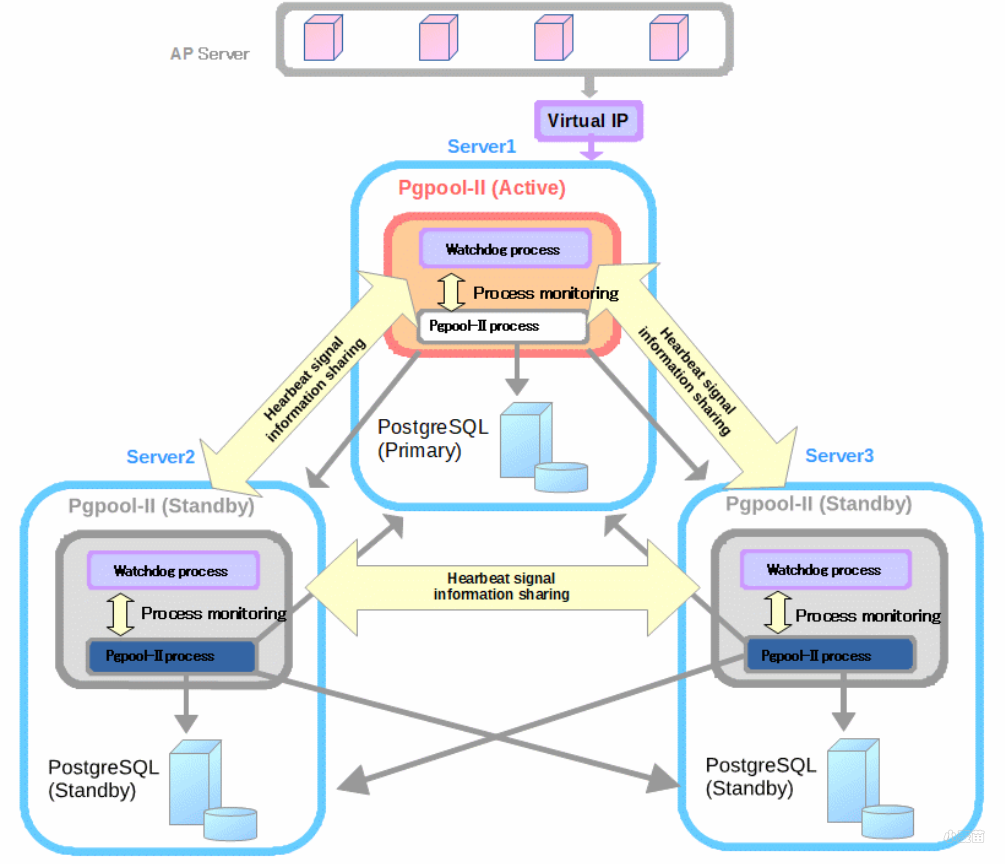
We use 3 servers with CentOS 7.9 installed. Let these servers be server1 server2, server3. We install PostgreSQL and Pgpool-II on each server.
Figure 8-1. Cluster System Configuration
Note: The roles of
Active,Standby,Primary,Standbyare not fixed and may be changed by further operations.
Table 8-2. Hostname and IP address
| Hostname | IP Address | Virtual IP |
|---|---|---|
| server1 | 192.168.137.101 | 192.168.137.150 |
| server2 | 192.168.137.102 | 192.168.137.150 |
| server3 | 192.168.137.103 | 192.168.137.150 |
Table 8-3. PostgreSQL version and Configuration
| Item | Value | Detail |
|---|---|---|
| PostgreSQL Version | 14.0 | - |
| port | 5432 | - |
| $PGDATA | /var/lib/pgsql/14/data | - |
| Archive mode | on | /var/lib/pgsql/archivedir |
| Replication Slots | Enable | - |
| Start automatically | Enable | - |
Table 8-4. Pgpool-II version and Configuration
| Item | Value | Detail |
|---|---|---|
| Pgpool-II Version | 4.3.0 | - |
| port | 9999 | Pgpool-II accepts connections |
| 9898 | PCP process accepts connections | |
| 9000 | watchdog accepts connections | |
| 9694 | UDP port for receiving Watchdog's heartbeat signal | |
| Config file | /etc/pgpool-II/pgpool.conf | Pgpool-II config file |
| Pgpool-II start user | postgres (Pgpool-II 4.1 or later) | Pgpool-II 4.0 or before, the default startup user is root |
| Running mode | streaming replication mode | - |
| Watchdog | on | Life check method: heartbeat |
| Start automatically | Enable | - |
Table 8-5. Various sample scripts included in rpm package
| Feature | Script | Detail |
|---|---|---|
| Failover | /etc/pgpool-II/failover.sh.sample | Run by failover_command to perform failover |
| /etc/pgpool-II/follow_primary.sh.sample | Run by follow_primary_command to synchronize the Standby with the new Primary after failover. | |
| Online recovery | /etc/pgpool-II/recovery_1st_stage.sample | Run by recovery_1st_stage_command to recovery a Standby node |
| /etc/pgpool-II/pgpool_remote_start.sample | Run after recovery_1st_stage_command to start the Standby node | |
| Watchdog | /etc/pgpool-II/escalation.sh.sample | Run by wd_escalation_command to switch the Active/Standby Pgpool-II safely |
The above scripts are included in the RPM package and can be customized as needed.
3. Installation
In this example, we install Pgpool-II and PostgreSQL RPM packages with YUM.
Install PostgreSQL from PostgreSQL YUM repository.
1 2 | [all servers]# yum install -y https://download.postgresql.org/pub/repos/yum/reporpms/EL-7-x86_64/pgdg-redhat-repo-latest.noarch.rpm [all servers]# yum install -y postgresql14-server |
Since Pgpool-II related packages are also included in PostgreSQL YUM repository, add the "exclude" settings to /etc/yum.repos.d/pgdg-redhat-all.repo so that Pgpool-II is not installed from PostgreSQL YUM repository.
1 | [all servers]# vi /etc/yum.repos.d/pgdg-redhat-all.repo |
The following is a setting example of /etc/yum.repos.d/pgdg-redhat-all.repo.
1 2 3 4 5 6 7 8 9 10 11 12 13 14 15 16 17 18 19 20 21 22 23 24 25 26 27 28 | [pgdg-common] ... exclude=pgpool* [pgdg14] ... exclude=pgpool* [pgdg13] ... exclude=pgpool* [pgdg12] ... exclude=pgpool* [pgdg11] ... exclude=pgpool* [pgdg10] ... exclude=pgpool* [pgdg96] ... exclude=pgpool* |
Install Pgpool-II from Pgpool-II YUM repository.
1 2 3 | [all servers]# yum install -y https://www.pgpool.net/yum/rpms/4.3/redhat/rhel-7-x86_64/pgpool-II-release-4.3-1.noarch.rpm [all servers]# yum install -y pgpool-II-pg14-* |
4. Before Starting
Before you start the configuration process, please check the following prerequisites.
Set up PostgreSQL streaming replication on the primary server. In this example, we use WAL archiving.
First, we create the directory
/var/lib/pgsql/archivedirto store WAL segments on all servers. In this example, only Primary node archives WAL locally.12[all servers]# su - postgres[all servers]$ mkdir /var/lib/pgsql/archivedirThen we edit the configuration file
$PGDATA/postgresql.confonserver1(primary) as follows. Enablewal_log_hintsto usepg_rewind. Since the Primary may become a Standby later, we sethot_standby = on.123456789listen_addresses = '*'archive_mode = onarchive_command = 'cp "%p" "/var/lib/pgsql/archivedir/%f"'max_wal_senders = 10max_replication_slots = 10wal_level = replicahot_standby = onwal_log_hints = onWe use the online recovery functionality of Pgpool-II to setup standby server after the primary server is started.
Because of the security reasons, we create a user
replsolely used for replication purpose, and a userpgpoolfor streaming replication delay check and health check of Pgpool-II.Table 8-6. Users
User Name Password Detail repl repl PostgreSQL replication user pgpool pgpool Pgpool-II health check (health_check_user) and replication delay check (sr_check_user) user postgres postgres User running online recovery 12345678[server1]# psql -U postgres -p 5432postgres=# SET password_encryption = 'scram-sha-256';postgres=# CREATE ROLE pgpool WITH LOGIN;postgres=# CREATE ROLE repl WITH REPLICATION LOGIN;postgres=# \password pgpoolpostgres=# \password replpostgres=# \password postgresIf you want to show "replication_state" and "replication_sync_state" column in SHOW POOL NODES command result, role
pgpoolneeds to be PostgreSQL super user or or inpg_monitorgroup (Pgpool-II4.1 or later). Grantpg_monitortopgpool:12GRANT pg_monitor TO pgpool;Note: If you plan to use detach_false_primary(Pgpool-II 4.0 or later), role "pgpool" needs to be PostgreSQL super user or or in "pg_monitor" group to use this feature.
Assuming that all the Pgpool-II servers and the PostgreSQL servers are in the same subnet and edit
pg_hba.confto enablescram-sha-256authentication method.123host all all samenet scram-sha-256host replication all samenet scram-sha-256To use the automated failover and online recovery of Pgpool-II, the settings that allow passwordless SSH to all backend servers between Pgpool-II execution user (default root user) and
postgresuser and betweenpostgresuser andpostgresuser are necessary. Execute the following command on all servers to set up passwordlessSSH. The generated key file name isid_rsa_pgpool.12345678910111213[all servers]# cd ~/.ssh[all servers]# ssh-keygen -t rsa -f id_rsa_pgpool[all servers]# ssh-copy-id -i id_rsa_pgpool.pub postgres@server1[all servers]# ssh-copy-id -i id_rsa_pgpool.pub postgres@server2[all servers]# ssh-copy-id -i id_rsa_pgpool.pub postgres@server3[all servers]# su - postgres[all servers]$ cd ~/.ssh[all servers]$ ssh-keygen -t rsa -f id_rsa_pgpool[all servers]$ ssh-copy-id -i id_rsa_pgpool.pub postgres@server1[all servers]$ ssh-copy-id -i id_rsa_pgpool.pub postgres@server2[all servers]$ ssh-copy-id -i id_rsa_pgpool.pub postgres@server3After setting SSH, use
ssh postgres@serverX -i ~/.ssh/id_rsa_pgpoolcommand to make sure that you can log in without entering a password. Edit/etc/ssh/sshd_configif necessary and restart sshd.To allow
repluser without specifying password for streaming replication and online recovery, and execute pg_rewind usingpostgres, we create the.pgpassfile inpostgresuser's home directory and change the permission to600on each PostgreSQL server.12345678910[all servers]# su - postgres[all servers]$ vi /var/lib/pgsql/.pgpassserver1:5432:replication:repl:<repl user password>server2:5432:replication:repl:<repl user password>server3:5432:replication:repl:<repl user password>server1:5432:postgres:postgres:<postgres user password>server2:5432:postgres:postgres:<postgres user password>server3:5432:postgres:postgres:<postgres user password>[all servers]$ chmod 600 /var/lib/pgsql/.pgpassWhen connect to Pgpool-II and PostgreSQL servers, the target port must be accessible by enabling firewall management softwares. Following is an example for CentOS/RHEL7.
1234[all servers]# firewall-cmd --permanent --zone=public --add-service=postgresql[all servers]# firewall-cmd --permanent --zone=public --add-port=9999/tcp --add-port=9898/tcp --add-port=9000/tcp --add-port=9694/udp[all servers]# firewall-cmd --reloadWe set Pgpool-II to start automatically on all servers.
12[all servers]# systemctl enable pgpool.serviceNote: If you set the auto-start of Pgpool-II, you need to change the search_primary_node_timeout to an appropriate value that you can start the PostgreSQL after the server has been started. Pgpool-II will fail if it can't connect to thePostgreSQL on the backend during the
search_primary_node_timeout.
5. Create pgpool_node_id
From Pgpool-II 4.2, now all configuration parameters are identical on all hosts. If watchdog feature is enabled, to distinguish which host is which, a pgpool_node_id file is required. You need to create a pgpool_node_id file and specify the pgpool (watchdog) node number (e.g. 0, 1, 2 ...) to identify pgpool (watchdog) host.
server1123[server1]# cat /etc/pgpool-II/pgpool_node_id0server2123[server2]# cat /etc/pgpool-II/pgpool_node_id1server3123[server3]# cat /etc/pgpool-II/pgpool_node_id2
6. Pgpool-II Configuration
When installing Pgpool-II using YUM, the Pgpool-II configuration file pgpool.conf is installed in /etc/pgpool-II.
Since from Pgpool-II 4.2, all configuration parameters are identical on all hosts, you can edit pgpool.conf on any pgpool node and copy the edited pgpool.conf file to the other pgpool nodes.
6.1. Clustering mode
Pgpool-II has several clustering modes. To set the clustering mode, backend_clustering_mode can be used. In this configuration example, streaming replication mode is used.
1 2 | backend_clustering_mode = 'streaming_replication' |
6.2. listen_addresses
To allow Pgpool-II to accept all incoming connections, we set listen_addresses = '*'.
1 2 | listen_addresses = '*' |
6.3. port
Specify the port number Pgpool-II listen on.
1 2 | port = 9999 |
6.4. Streaming Replication Check
Specify replication delay check user and password in sr_check_user and sr_check_password. In this example, we leave sr_check_password empty, and create the entry in pool_passwd. See Section 6.9 for how to create the entry in pool_passwd. From Pgpool-II 4.0, if these parameters are left blank, Pgpool-II will first try to get the password for that specific user from pool_passwd file before using the empty password.
1 2 3 | sr_check_user = 'pgpool' sr_check_password = '' |
6.5. Health Check
Enable health check so that Pgpool-II performs failover. Also, if the network is unstable, the health check fails even though the backend is running properly, failover or degenerate operation may occur. In order to prevent such incorrect detection of health check, we set health_check_max_retries = 3. Specify health_check_user and health_check_password in the same way like sr_check_user and sr_check_password.
1 2 3 4 5 6 | health_check_period = 5 health_check_timeout = 30 health_check_user = 'pgpool' health_check_password = '' health_check_max_retries = 3 |
6.6. Backend Settings
Specify the PostgreSQL backend information. Multiple backends can be specified by adding a number at the end of the parameter name.
1 2 3 4 5 6 7 8 9 10 11 12 13 14 15 16 17 18 19 20 | # - Backend Connection Settings - backend_hostname0 = 'server1' backend_port0 = 5432 backend_weight0 = 1 backend_data_directory0 = '/var/lib/pgsql/14/data' backend_flag0 = 'ALLOW_TO_FAILOVER' backend_hostname1 = 'server2' backend_port1 = 5432 backend_weight1 = 1 backend_data_directory1 = '/var/lib/pgsql/14/data' backend_flag1 = 'ALLOW_TO_FAILOVER' backend_hostname2 = 'server3' backend_port2 = 5432 backend_weight2 = 1 backend_data_directory2 = '/var/lib/pgsql/14/data' backend_flag2 = 'ALLOW_TO_FAILOVER' |
To show "replication_state" and "replication_sync_state" column in SHOW POOL NODES command result, backend_application_name parameter is required. Here we specify each backend's hostname in these parameters. (Pgpool-II 4.1 or later)
1 2 3 4 5 6 7 | ... backend_application_name0 = 'server1' ... backend_application_name1 = 'server2' ... backend_application_name2 = 'server3' |
6.7. Failover configuration
Specify failover.sh script to be executed after failover in failover_command parameter. If we use 3 PostgreSQL servers, we need to specify follow_primary_command to run after failover on the primary node failover. In case of two PostgreSQL servers, follow_primary_command setting is not necessary.
Pgpool-II replaces the following special characters with the backend specific information while executing the scripts. See failover_command for more details about each character.
1 2 3 | failover_command = '/etc/pgpool-II/failover.sh %d %h %p %D %m %H %M %P %r %R %N %S' follow_primary_command = '/etc/pgpool-II/follow_primary.sh %d %h %p %D %m %H %M %P %r %R |
Note: %N and %S are added in Pgpool-II 4.1. Please note that these characters cannot be specified if using Pgpool-II 4.0 or earlier.
Sample scripts failover.sh and follow_primary.sh are installed in /etc/pgpool-II/. Create failover scripts using these sample files.
1 2 3 4 | [all servers]# cp -p /etc/pgpool-II/failover.sh{.sample,} [all servers]# cp -p /etc/pgpool-II/follow_primary.sh{.sample,} [all servers]# chown postgres:postgres /etc/pgpool-II/{failover.sh,follow_primary.sh} |
Basically, it should work if you change PGHOME according to PostgreSQL installation directory.
1 2 3 4 5 6 7 8 9 10 | [all servers]# vi /etc/pgpool-II/failover.sh ... PGHOME=/usr/pgsql-14 ... [all servers]# vi /etc/pgpool-II/follow_primary.sh ... PGHOME=/usr/pgsql-14 ... |
Since user authentication is required to use the PCP command in follow_primary_command script, we need to specify user name and md5 encrypted password in pcp.conf in format "username:encrypted password".
if pgpool user is specified in PCP_USER in follow_primary.sh,
1 2 3 4 5 | # cat /etc/pgpool-II/follow_primary.sh ... PCP_USER=pgpool ... |
then we use pg_md5 to create the encrypted password entry for pgpool user as below:
1 2 | [all servers]# echo 'pgpool:'`pg_md5 PCP password` >> /etc/pgpool-II/pcp.conf |
Since follow_primary.sh script must execute PCP command without entering a password, we need to create .pcppass in the home directory of Pgpool-II startup user (postgres user) on each server.
1 2 3 4 | [all servers]# su - postgres [all servers]$ echo 'localhost:9898:pgpool:<pgpool user password>' > ~/.pcppass [all servers]$ chmod 600 ~/.pcppass |
Note: The
follow_primary.shscript does not support tablespaces. If you are using tablespaces, you need to modify the script to support tablespaces.
6.8. Pgpool-II Online Recovery Configurations
Next, in order to perform online recovery with Pgpool-II we specify the PostgreSQL user name and online recovery command recovery_1st_stage. Because Superuser privilege in PostgreSQL is required for performing online recovery, we specify postgres user in recovery_user. Then, we create recovery_1st_stage and pgpool_remote_start in database cluster directory of PostgreSQL primary server (server1), and add execute permission.