合 【OGG】Using the Oracle GoldenGate for SQL Server CDC Capture Replication
Before You Begin
This tutorial shows you how to use the CDC Capture replication, which utilizes the SQL Server Change Data Capture feature to read DML from the transaction log and load it into individual staging tables for each user table enabled with supplemental logging. The CDC Extract then reads the DML from the staging tables and reconstructs transactions then writes the data into trail files.
This tutorial takes approximately 15 minutes to complete.
Background
Previously, only Classic Capture was possible with SQL Server databases. With the Oracle GoldenGate 12c (12.3.0.1) release, the CDC Capture replication is introduced.
What Do You Need?
Before starting this tutorial:
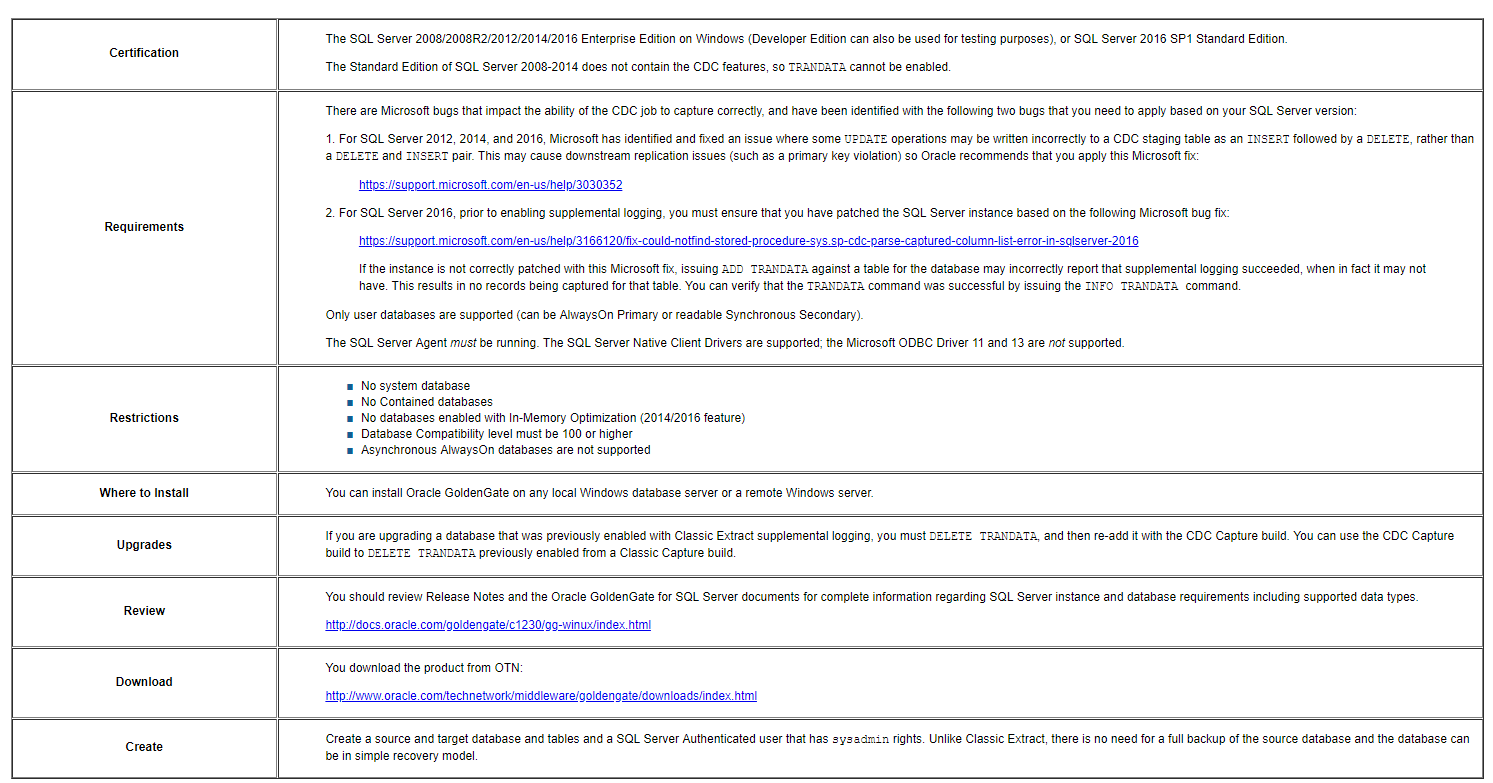
Using the following tasks, you create both a Uni-Directional and a Bi-Directional SQL Server to SQL Server Replication.
一、Setting Up the Uni-Directional CDC Extract
Create a system DSN to the source database and set the change the default database to option to the source database. Use a Windows or SQL Server login that has
sysadminrights for this connection. You can alter the permissions todbownerat a later time, if you want to use the same account for the Extract and are not allowed to have Extract running withsysadmin.Unzip the
ggs_Windows_x64_MSSQL_64bit_CDC.zipfile to a new Oracle GoldenGate installation directory.Create a
GLOBALSfile in the base Oracle GoldenGate installation directory, and set theGGSCHEMAparameter to that of an existing or new schema in the source database. Oracle recommends that you create a specific schema for Oracle GoldenGate objects.For example -
1CREATE SCHEMA ggs. Do not to use the dbo schema.
1GGSCI> EDIT PARAMS ./GLOBALSSave the GLOBALS file.
Using
GGSCHEMAin theGLOBALSfile is a new requirement for Oracle GoldenGate for SQL Server CDC Capture. It is required so thatADD TRANDATAcan identify which schema to create necessary objects under then Extract knows which schema to call those objects from during runtime. Classic Extract does not have this requirement.Start
ggsci.exeand create the necessary sub directories.1GGSCI> CREATE SUBDIRSCreate the Manager parameter file; list a valid
PORTfor the Manager to use, then save the file. For example,PORT 78091GGSCI> EDIT PARAMS MGRConnect to the source database from GGSCI and enable supplemental logging for the user tables to be captured from using one of the following:
For a SQL Server Authenticated DSN, the
USERIDandPASSWORDare optional:12GGSCI> DBLOGIN SOURCEDB sourcedsn [USERID user PASSWORD password]GGSCI> ADD TRANDATA dbo.*Or for a Windows Authenticated DSN:
12GGSCI> DBLOGIN SOURCEDB sourcedsnGGSCI> ADD TRANDATA dbo.*In the Management Studio, within a query window for the source database. You must manually drop the SQL Server CDC cleanup job for the database because it may cause data loss for the Extract.
1EXECUTE sys.sp_cdc_drop_job 'cleanup';Use the
ogg_cdc_cleanup_setup.batutility (in the Oracle GoldenGate installation directory) to create the Oracle GoldenGate CDC cleanup job and associated objects. Theggschemaname used must be the same that you used with theGGSCHEMAparameter of theGLOBALSfile. You must use a SQL Server authenticated user that hassysadminrights.1d:\>OGG\ogg_cdc_cleanup_setup.bat createJob username password databasename servername\instancename ggschemaCreate and save a new Extract parameter file using this sample of the minimum required parameters for a uni-directional implementation.
123456GGSCI> EDIT PARAMS cdcextEXTRACT cdcextSOURCEDB sourcedsn [USERID user PASSWORD password]EXTTRAIL ./dirdat/ceTABLE dbo.*;本人提供Oracle(OCP、OCM)、MySQL(OCP)、PostgreSQL(PGCA、PGCE、PGCM)等数据库的培训和考证业务,私聊QQ646634621或微信dbaup66,谢谢!